

Microsoft has begun rolling out the KB5079391 update for Windows 11 versions 24H2 and 25H2, which includes notable changes such as support for monitors with a 1000 Hz update rate and an important fix for Smart App Control.
The preview update is not automatically installed for everyone and must be downloaded manually from Windows Update unless the user has enabled instant updates.
Microsoft has indicated that all the features will be included in the required April update, allowing users to wait if they choose to.
The most notable feature of the update is the support for 1000 Hz.
The main highlight of this update is the support for a 1000 Hz refresh rate, which is considered excessive as very few people currently own monitors with this capability. These high refresh rate panels only started appearing after CES 2026.
Microsoft is getting Windows 11 ready for the increasing prevalence of such hardware to prevent system bottlenecks.
The new feature is particularly significant for hardcore gamers compared to regular users. It demonstrates how Windows 11 is evolving to meet the demands of modern hardware.
Smart App Control is now becoming less irritating.
The Smart App Control feature in Windows security has undergone a significant change. Previously, if this feature blocked a legitimate application and needed to be disabled or reconnected, it often necessitated extreme measures like system reinstallation or resetting.
Microsoft now enables you to easily activate or deactivate SAC with KB5079391, eliminating the need to reinstall Windows.
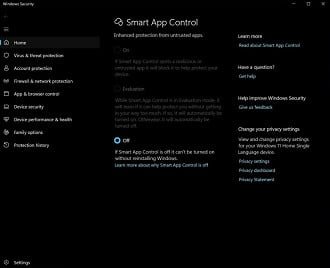
Smart App Control seemed good in theory as it aimed to stop malicious programs, but it caused issues by flagging harmless software. With this alteration, Windows 11 is now more practical and less sophisticated.
File Explorer has also improved.
The File Explorer has been updated to address a longstanding issue related to unlocking previews of downloaded files from the internet. This update aims to make the process of unlocking these files more reliable, particularly beneficial for users dealing with frequent downloads and inconsistent locks.
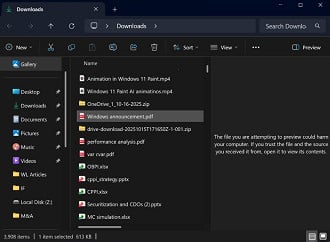
The Explorer now has Voice Typing support for renaming files, and the Advanced Security Settings window enables sorting permissions. These upgrades enhance the system for everyday tasks.
App Settings are still being modified
Microsoft used the update as an opportunity to make further improvements to the Settings app, enhancing the visibility of device specifications, making visual enhancements to account and user areas, and increasing accessibility to Microsoft 365-related controls within the system. The application homepage also appears to have improved speed.
Microsoft is still making efforts to organize a part of Windows that has been in transition for years, with changes that may not have a significant impact on users’ lives.
Source: Provide the original text that needs to be paraphrased.

