

Android 17 Beta 3 introduced improved multitasking features, bringing a more desktop-like experience to users. This version is now accessible for the Pixel 6 series, indicating the finalization of APIs and development tools.
Android 17 appears more grown-up in terms of productivity with the introduction of the Bubbles system, allowing users to open apps in floating windows for multitasking without constant screen switching. This feature is especially beneficial for foldable devices and tablets, as it optimizes screen space.
Google aims to enhance the practicality of Android on a daily basis.
Google is now incorporating features into Android that have been offered by Samsung and other manufacturers for years, making multitasking more seamless and integrated into the system. This shift aims to make mobile devices more versatile and user-friendly for tasks like watching videos while messaging or using multiple apps simultaneously on a smaller screen.
Screen recording has been enhanced to be more convenient by displaying capture controls in a floating panel accessed through Quick Settings. Android now provides shortcuts to view, edit, delete, or share the recorded video once the recording is complete, eliminating the need for users to search for the file manually.
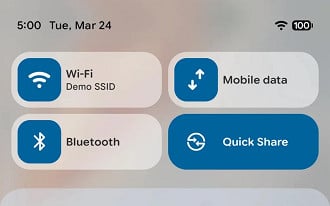
Google made a change to address a long-standing issue by replacing the combined “Internet” block with individual options for Wi-Fi and mobile data. This update makes it easier to manage connections and streamlines the navigation in Fast Settings.
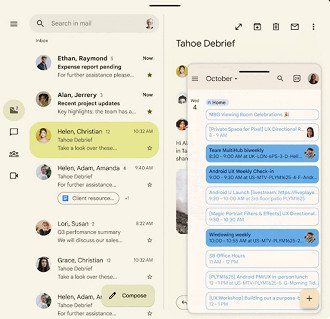
Beta also enhances widget functionality on external monitors, enhances the visual layout of the home screen by enabling the option to conceal app names, and introduces an interactive Picture-in-Picture mode for windows on the desktop, allowing certain apps to maintain accessible controls while operating in other windows, thus creating room for increased productivity during video calls and multitasking.
Advancements in accessibility, audio, and privacy are also progressing.
Android 17 Beta 3 includes significant improvements in less noticeable but still important aspects, such as giving hearing aid users the option to select the destination of system sounds like notifications, taps, and alarms between the hearing aid and the phone speaker.
The system varies in how it manages password visibility, quickly hiding characters when users enter them using a physical keyboard, thus enhancing privacy in specific situations.
A new feature in this field is a fresh location button that allows applications to access the user’s precise location for the current session only, without requiring a lasting permission in the system.
Android now offers the dark theme with app exceptions, enabling users to maintain the system in dark mode while certain apps retain their regular appearance.
Android 17 Beta 3 prioritizes practical functionality over flashy visual effects, marking a shift towards addressing real-world issues.
Please provide the text you would like me to paraphrase.
